
Ever woken up to a mysterious clatter on the roof, convinced this is the night you’ll finally meet a burglar?
That’s exactly what happened to a mate of ours, Dave, up in Terrigal. He'd just forked out for a new security system, heart pounding like a drum solo, only for the crystal-clear footage to reveal a cheeky possum trying to nick his prize-winning petunias. Crisis averted, petunias safe.
Why Security Systems Are Your Best Mate
Dave's little possum story gets right to the heart of what modern CCTV and security systems are all about: peace of mind.
Forget the grainy, ghost-like footage you see on late-night news clips. Today's systems give you razor-sharp video, smart alerts that can tell the difference between a person and a parcel, and the power to check in on your place from anywhere—whether you're stuck in traffic on the M1, up in Newcastle for work, or kicking back on holiday in Bali.
This guide is your no-nonsense walkthrough, packed with practical advice to help you secure what matters most.
More Than Just Catching Possums
While outing furry garden thieves is a definite perk, the real value is in creating a secure bubble around your home or business. It’s about knowing the family is safe, your tools are where you left them, and your property is being watched over even when you can’t be there. It's no wonder more and more Aussies are getting on board.
The demand for better security is growing fast. In fact, the Australian CCTV market is projected to skyrocket from around $1.8 billion AUD to over $9.3 billion AUD by 2033. This boom is being fuelled by everything from general safety concerns to incredible tech advancements, like AI-powered cameras that can spot trouble before it even starts. You can read more about the growth of the Aussie CCTV market here.
For you, this growth means better, smarter, and more affordable options are hitting the market all the time.
A good security system isn’t just about recording what happens; it’s about stopping things from happening in the first place. A visible camera is often the best deterrent, making a potential intruder think twice and move on to an easier target down the road.
From simple doorbell cameras to sophisticated multi-site setups for businesses, there’s a solution for every need and budget. This guide will help you figure out exactly which one is right for you.
Getting Your Head Around the Tech (Without the Headache)
Let's be honest, the moment someone starts talking about CCTV and security systems, the technical jargon can make your eyes glaze over. But you don't need an engineering degree to get the gist of it.
Think of your security setup like a well-trained kelpie—it’s smart, always alert, and knows exactly when to kick into action. We’ll break down the lingo so you can feel totally confident when chatting with an installer and know what you're actually paying for.
The Brains of the Operation: NVR vs. DVR
First things first, let's talk about the recorders. These are the devices that actually store all the video footage your cameras capture. You’ll mainly hear two terms thrown around: DVR and NVR.
Think of a DVR (Digital Video Recorder) like an old VCR. It takes an analogue signal from older, more traditional cameras through a coaxial cable and then does the work of converting it into a digital file for storage. It's reliable, tried-and-true technology, but it's definitely a bit old-school these days.
An NVR (Network Video Recorder), on the other hand, is more like Netflix for your security footage. It works with modern IP (Internet Protocol) cameras, which are basically tiny computers that capture and process high-quality video right there on the spot. The footage is already digital, so it just zips over your computer network to the NVR to be stored.
The bottom line is this: NVR systems almost always give you higher resolution, way more flexibility, and access to smarter features. They’re the standard choice for most new setups we see on the Central Coast.
Meeting the Key Players in Your System
Alright, now for the other bits and pieces that bring it all together. Getting familiar with these will help you choose the best security cameras for your home.
-
IP Cameras: These are the sharp, high-definition eyes of any modern system. They connect directly to your network (just like a laptop) and deliver crystal-clear images that make identifying a face or a number plate a breeze.
-
PoE (Power over Ethernet): This is a brilliant piece of tech that sounds much more complex than it really is. All it means is that a single network cable carries both power and data to your IP camera. It makes for a much tidier and simpler installation, with less drilling and fewer cables to hide.
-
Cloud Storage: This gives you the option to save your footage online, either instead of or as a backup to a physical NVR box in your house. It’s a fantastic safety net—if a burglar breaks in and nicks the recorder, your crucial footage is still safe and sound in the cloud.
With these basics under your belt, you’re in a great spot to make a smart, informed decision about protecting what matters most, whether that’s a home in Gosford or a business in Newcastle.
The Essential Parts of Your Security Setup
Alright, let's pull back the curtain on what makes a solid CCTV and security system tick. It’s not just one magic box; it's a team of specialised gadgets working in concert to keep your place safe. Think of it like a footy team—each player has a specific role, and they’re only truly effective when they work together.
The real magic happens when you get the combination right for your specific property, whether it's a classic weatherboard in Newcastle or a new build on the Central Coast.
Your Lookouts: The Cameras
This is the most obvious part of the setup—the eyes of your whole operation. But not all cameras are created equal. The camera you stick on a windswept coastal property needs to be a lot tougher than the one watching over your living room.
You’ll want cameras that are at least IP66-rated or higher to stand up to the salty air and sideways rain we get around here. For inside, you might want something more discreet that blends into the decor. It's all about picking the right tool for the job.
A Newcastle installer once told us about a client who put an indoor camera outside to save a few bucks. After one decent southerly buster, it was completely waterlogged and useless. Investing in proper, weatherproof outdoor cameras is non-negotiable for coastal homes.
The Brains and Brawn
Behind the scenes, you have the components that manage and react to what the cameras see. These are the unsung heroes of your security system.
-
The Recorder (NVR/DVR): This is the coach and the memory bank, all rolled into one. It records all the footage, manages your settings, and lets you play back incidents. As we mentioned earlier, a modern NVR is the way to go for crisp, high-quality video.
-
Sensors: Think of these as your ever-watchful guards. Motion sensors, door/window contacts, and glass-break detectors are your first line of defence, alerting the system the moment something is out of place.
-
Alarms: These are the loudmouths of the team, and that’s a good thing! A blaring siren is often more than enough to send a would-be intruder packing before they can do any real damage.
The Bouncers: Modern Access Control
Your security doesn't have to stop at just watching and waiting. Modern systems let you actively control who comes and goes, adding a powerful layer of proactive protection.
This is where things get really smart. You can add things like video intercoms to see and speak to whoever is at your door from your phone—whether you're at work in Sydney or just on the couch. Smart locks let you grant temporary access to a tradie or a dog walker without ever handing over a physical key.
For larger properties or businesses, automated gates are the ultimate gatekeepers. They can integrate seamlessly with your CCTV and security systems, allowing you to manage access with the tap of a button and ensure only authorised people get onto your property. It’s all about building layers of security that work together to create a formidable defence.
Comparing Security Systems for Your Needs
Picking the right security system can feel a bit like choosing a new car. They all get you from A to B, but the experience, features, and cost can be wildly different. You wouldn't take a tiny hatchback off-roading, and you don't need a monster truck for a quick trip to the shops. It’s all about finding the perfect fit for your specific needs.
Not all CCTV and security systems are created equal. Let's break down some of the most common setups to see what makes the most sense for your home or business on the Central Coast, in Sydney, or up in Newcastle.
AI Smarts vs Old School Analogue
The biggest debate these days is between modern AI-powered cameras and traditional analogue systems. Think of analogue cameras as the reliable old Holden Commodore from back in the day—it gets the job done, but it’s basic. The footage is often lower resolution, and it can’t do much more than just record what it sees.
AI-powered IP cameras, on the other hand, are like the latest EV. They’re packed with smart tech that can distinguish between a person, a vehicle, and that pesky possum from next door. This means fewer false alarms waking you up at 2 AM because a tree branch was swaying in the wind.
For a real-world example, take a café owner in Sydney we worked with recently. His shop was getting repeatedly tagged by a graffiti artist late at night. His old analogue system captured a blurry figure, but it wasn't much help.
After upgrading to an AI system, he was able to set a specific alert for human motion in that area after closing time. The next time it happened, he got a crystal-clear notification and footage on his phone, which was enough for the local police to identify the culprit.
This kind of specific, intelligent monitoring is where modern systems truly shine. It's a key reason the Australian CCTV camera market is expected to grow to nearly $972.54 million AUD by 2034, driven by this shift towards smarter, IP-based systems with features like remote monitoring and cloud storage.
Wireless Freedom vs Hardwired Reliability
Another key choice is between wireless and hardwired alarms. Wireless systems are fantastic for their flexibility and easy installation, especially in older homes where running new cables can be a massive headache. However, they rely on batteries and a strong Wi-Fi signal, which can sometimes be a weak link.
Hardwired systems are the gold standard for reliability. Since they’re physically connected to your power and recorder, you don’t have to worry about batteries dying or a Wi-Fi dropout leaving you vulnerable. They are more labour-intensive to install, but for a ‘set and forget’ solution, they can't be beaten. You can explore more options in our comprehensive guide to security and CCTV solutions.
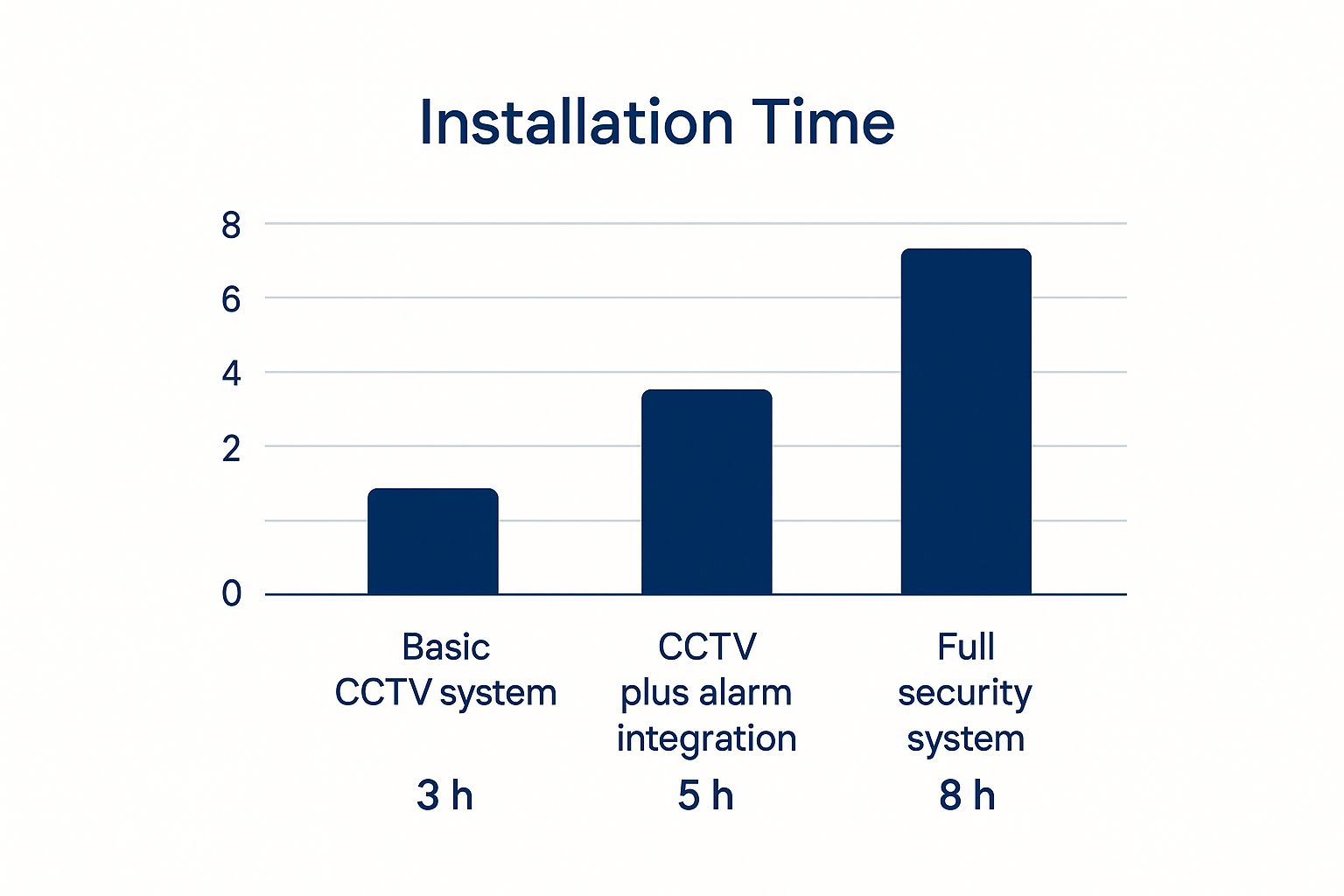
The image above gives you a rough idea of the time involved. As you can see, a more integrated system naturally takes longer to set up, but the result is a more robust and comprehensive security net.
The right choice often comes down to your property and priorities. For a small rental, a wireless setup might be perfect. For a large family home or a business with critical assets, the rock-solid reliability of a hardwired system is usually worth the extra effort upfront.
Comparison of CCTV and Security System Types
To make things even clearer, here’s a quick comparison of the main types of systems you'll come across. This should help you weigh up the features and costs to see what aligns with your security goals.
| System Type | Key Features | Ideal Use | Approximate Cost (AUD) |
|---|---|---|---|
| AI-Powered Cameras | Person/vehicle detection, real-time alerts, high-resolution video, facial recognition. | Businesses, high-value homes, areas needing specific monitoring. | $1,500 – $6,000+ |
| Alarm Systems | Door/window sensors, motion detectors, audible sirens, back-to-base monitoring options. | Standard home security, small retail shops, deterring break-ins. | $800 – $3,500 |
| Access Control | Key cards, fobs, biometric scanners, timed access schedules, entry/exit logging. | Offices, apartment buildings, restricted areas, gyms. | $2,500 – $10,000+ |
| Automated Gates | Remote operation, intercom systems, vehicle sensors, integration with access control. | Gated communities, commercial properties, premium residential homes. | $5,000 – $15,000+ |
Ultimately, the best system might even be a combination of a few of these. For example, a business might pair AI cameras with a robust access control system to cover all its bases.
Choosing the Right System for Your Property
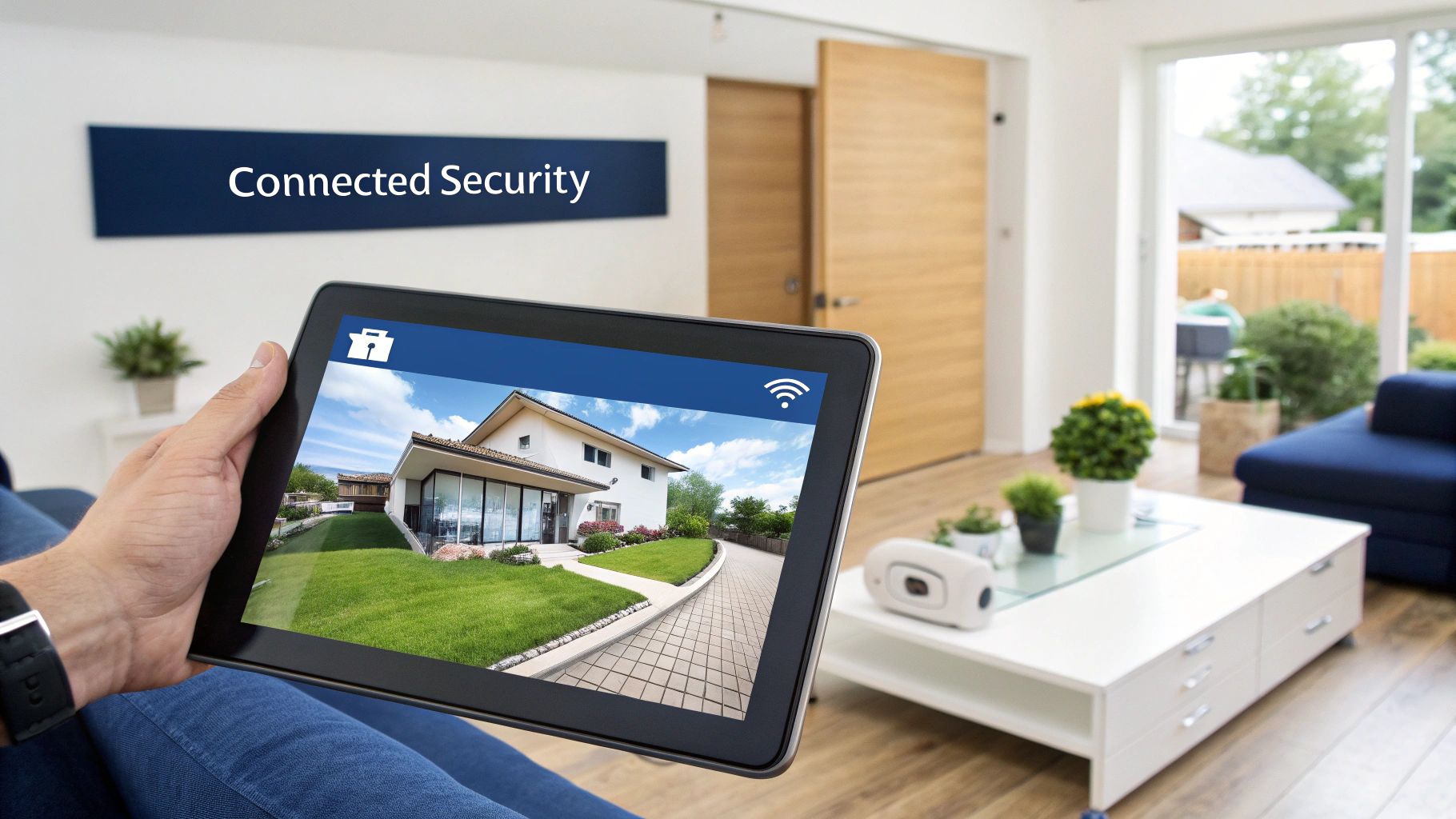
Feeling a bit swamped by all the options for CCTV and security systems? You’re not alone. It’s easy to get lost in the tech-speak and endless choices, but picking the right setup doesn’t have to be a headache.
The best way to start is to put yourself in the shoes of someone trying to break in. Seriously. Grab a cuppa and take a walk around your property, inside and out. Where are the weak spots? The side gate that’s always hidden from view? That dark corner of the backyard? Jot down every vulnerable area you can find. This simple exercise gives you a practical map of exactly where you need eyes and ears.
Setting a Realistic Budget
Now, let's talk money. Think of security as an investment in your peace of mind, not just another expense. The Australian video surveillance market is massive, pulling in around $4.1 billion AUD annually, and that number is only going up as the technology gets smarter.
You need to set a budget that you’re comfortable with, but one that’s also realistic for the level of protection you’re after. A basic DIY camera kit can be surprisingly affordable, often just a few hundred dollars. But if you're looking for a professionally installed, fully integrated system with all the trimmings, you'll be looking at a few thousand. Having a clear number in mind makes it much easier to filter out the noise and focus on what works for you.
Must-Haves for Central Coast and Newcastle Properties
If you live around the Central Coast or Newcastle, you know our weather can be pretty full-on. Your security gear needs to be built tough enough to handle everything from salty sea air to summer storms.
Here are a few things that should be on your non-negotiable list:
- Weatherproof Cameras: Don't even consider anything without at least an IP66 rating. This means it’s properly sealed against dust and can handle heavy rain and sea spray without giving up.
- Power Outage Protection: We all know how quickly a storm can knock the power out. A system with a battery backup or an Uninterruptible Power Supply (UPS) is crucial to keep things running when the grid goes down. For properties off the beaten track, solar-powered security camera systems are a brilliant way to stay secure, no matter what.
- Good Night Vision: A camera that can’t see in the dark is pretty useless. Make sure you get something with powerful infrared (IR) night vision so you get a clear picture, 24/7.
- Reliable Connectivity: Going wireless? Your Wi-Fi signal needs to be rock-solid, especially if you have a larger home or solid brick walls that can block the signal.
An installer once told me about a client who proudly installed a new camera on his garage. The problem? He’d aimed it perfectly… at his neighbour's prize-winning rose bush. He had a stunning 4K view of every petal but completely missed his own driveway.
It’s a funny story, but it proves a serious point: placement is everything. Don’t just mount cameras high up and hope for the best. Think about the angles you need to capture faces and cover key entry points. Getting this right is what makes your system a powerful deterrent, not just a collection of expensive gadgets.
Keeping Your Security System in Top Shape
Alright, so you’ve got your shiny new CCTV and security systems all set up. Fantastic. But the job isn't quite done. Think of your system like a car—it needs regular TLC to keep it running smoothly and reliably when you need it most. Thankfully, you don't need to be a tech genius to handle the basics.
A little proactive care goes a massive way in making sure your investment actually protects you for years. Neglecting it is like buying a guard dog and forgetting to feed it. It might look the part, but it won’t be much help when things go sideways.
Simple Maintenance Anyone Can Do
You’d be amazed at how much a bit of simple housekeeping can boost your system's performance. Especially after a big southerly storm rolls through the Central Coast, your outdoor cameras can end up looking like they've been through a mud pit.
Just a quick wipe of the lenses with a microfibre cloth can be the difference between crystal-clear footage and a useless blurry mess. It’s a five-minute job that makes sure your cameras can actually see what’s happening.
Here are a few other easy tasks to add to your calendar:
- Test Your Sensors: Once a month, arm your system and deliberately open a protected door or window. You want to hear that alarm go off! It’s far better to find a faulty sensor during a drill than during a real emergency.
- Check Your Connections: Take a look behind your recorder and give the cables a gentle wiggle. You just want to make sure everything is plugged in securely. A loose connection is often the simple culprit behind a camera going offline.
- Update Your Firmware: Just like your smartphone, your security system's software needs updates. These patches often fix security vulnerabilities and can even add handy new features. Most modern systems will pop up a notification when an update is available.
An installer from Newcastle gave us a great tip: get a backup power source. A simple Uninterruptible Power Supply (UPS) can keep your cameras and recorder humming along during a blackout—which, let's be honest, is a prime time for trouble. It's a small investment for some serious peace of mind.
Smart Integration and Final Checks
To really get the most out of your setup, it’s worth connecting it to your smart home gear. Hooking your system up to Google Assistant or Amazon Alexa lets you use simple voice commands like, "Hey Google, show me the front door camera." It’s a seriously convenient way to check on things without even reaching for your phone.
Ultimately, regular checks are the key to keeping your security robust. If you want a deeper dive into getting everything set up perfectly from the get-go, have a look at our guide on how to install security cameras. By staying on top of these simple tasks, you’ll ensure your system remains a reliable guardian for your home or business.
Got Questions About Your Security System? We've Got Answers
Still have a few things you're wondering about? That's completely normal. When you're diving into the world of CCTV and security systems, a few questions always pop up. Here are some straightforward answers to the things we get asked most by our clients across the Central Coast, Sydney, and Newcastle.
What Sort of Budget Should I Have?
This is the million-dollar question, isn't it? The honest answer is that it really depends. You could pick up a basic DIY camera kit for a few hundred dollars.
On the other hand, a professionally installed, comprehensive system with multiple cameras, alarms, and smart integrations could be anywhere from $2,000 to over $8,000 AUD. The best way forward is to figure out your absolute must-haves for peace of mind and then get a quote built around those needs.
Can I Just Install It Myself?
You absolutely can, and for a simple setup, it’s a decent way to save a bit of cash. But a quick word of warning: getting the camera angles, wiring, and network configuration right is often much fiddlier than it seems.
A professional installation guarantees you won't have any frustrating blind spots, all the connections will be secure, and the whole system is set up to work flawlessly. For anything more than a camera or two, it’s almost always worth calling in an expert.
It's a bit like changing a car tyre versus rebuilding the engine. You can handle the first one, but for the second, you'd want a mechanic. When it comes to something protecting your family or business, that professional touch is priceless.
What's the Real Difference Between IP and Analogue Cameras?
Think of it this way: analogue cameras are like watching an old standard-definition TV. They work, but the picture quality is grainy and details are hard to make out.
IP (Internet Protocol) cameras are the modern 4K Ultra HD equivalent. They give you a crystal-clear, high-resolution image that makes spotting a face or reading a number plate a breeze. For any new system today, IP cameras are the only way to go.
If you're curious about how these systems play with your other smart devices, have a look at our guide to smart home security systems.
Ready to feel safe, secure, and connected? The team at Advanced Comtech has the local knowledge to design the perfect security setup for your place. Get in touch with us today!





