
We’ve all seen it: the dreaded “bird’s nest” of wires crammed behind a desk or in a server closet. A poorly planned data cabling job doesn’t just look messy; it can cause endless headaches and network nightmares. On the flip side, a well-planned system is the secret sauce to a lightning-fast, reliable network.
Getting the planning right from the get-go is what separates a future-proofed system from a tangle of future problems. It’s all about thinking beyond what you need today and mapping out a network that can handle whatever you throw at it for years to come.
Kick Off Your Cabling Project Like a Pro
Let’s picture a growing Gosford business that just got the keys to a new office space. Before a single desk was moved or a computer plugged in, their first and smartest move was to sit down and properly map out their data needs. They weren’t just thinking about the handful of staff they had at that moment; they were planning for the team they expected to have in five years.
This kind of forward-thinking is the absolute core of a successful data cabling installation. You’re not just trying to get the internet working on day one. You’re building a robust digital foundation that can scale with your business and is ready for whatever comes next.
Think Beyond Today’s Connections
One of the most common mistakes I see is people only planning for the devices they have right now. That Gosford team, however, created a detailed blueprint. They walked through the empty office, marking a spot for every single potential connection.
Here’s what they considered:
- Workstations: They didn’t just account for current employees, but for future hires too. The plan was for two data points per desk—one for a computer and another for a VoIP phone. Smart.
- Shared Devices: Every printer, scanner, and server was given its own dedicated spot on the network map. No last-minute scrambling.
- Meeting Rooms: They factored in everything from AV systems and smart TVs to guest Wi-Fi access points.
- Security: This is a big one. They mapped out locations for security cameras and access control panels right from the start, which makes integrating everything much smoother down the line. You can dive deeper into this in our guide to security and CCTV installations.

This level of detail gave them all the info they needed to make an informed call between standard Cat6 cabling and the more future-proof Cat6a, which packs a bigger punch for high-demand applications.
Location, Location, Location
Another critical piece of the puzzle was deciding where to put the central communications rack, or ‘comms rack’. You can’t just shove it in any old dusty cupboard and hope for the best. It needs to be in a spot that’s central, well-ventilated, and secure. Getting this right from day one saves a world of pain later when you need to add new gear or troubleshoot an issue.
Your network is only as strong as its weakest link. A solid plan ensures every single component, from the cable in the wall to the patch panel in the rack, is up to the job. It’s the difference between seamless connectivity and constant, frustrating dropouts.
Investing in solid data infrastructure is a long-term play. Across Australia, there have been huge shifts in capital expenditure on telecommunications, largely driven by the NBN rollout. After spending peaked around 2017-2018, investment is expected to hold steady from 2024 onwards to support our ever-growing data consumption. This ongoing national upgrade really hammers home how vital it is to get your own foundational cabling right the first time.
Choosing the Right Cables and Components
Okay, let’s get into the good stuff—the actual hardware. Choosing the right gear for your data cabling installation is a lot like doing the plumbing for a new house. You wouldn’t use tiny pipes if you want a decent shower, would you? It’s the same deal here; you need cables that can handle the data flow you have now and, more importantly, what you’ll need down the track.
This isn’t just a quick trip to Bunnings to grab any old ethernet cable off the shelf.
Let me give you a real-world example. I recently worked with a homeowner in Newcastle who was a keen gamer and also worked from home. He was building the ultimate office and gaming den with a beast of a PC, a couple of 4K monitors, and plans for a home media server. His big question was: is standard Cat6 cabling enough, or should he spend the extra for Cat6a to really future-proof his setup?
Cat6 vs. Cat6a: The Great Cable Debate
For our Newcastle gamer, Cat6 was a tempting option. It’s more affordable and easily handles the 1 Gigabit per second (Gbps) speed of his current NBN connection. It can even push up to 10 Gbps over shorter distances, which is plenty for streaming Netflix in 4K while downloading massive game files.
But he was thinking five years ahead. What happens when internet speeds jump again? Or when he wants to run multiple high-bandwidth devices all at once?
This is where Cat6a really comes into its own. It’s a bit thicker and less flexible, sure, but it’s built to reliably handle 10 Gbps speeds over the full 100-metre distance. It also has better shielding, which means less chance of interference from nearby power cables—a classic problem inside wall cavities.
This image gives you a quick visual breakdown of what we’re talking about.
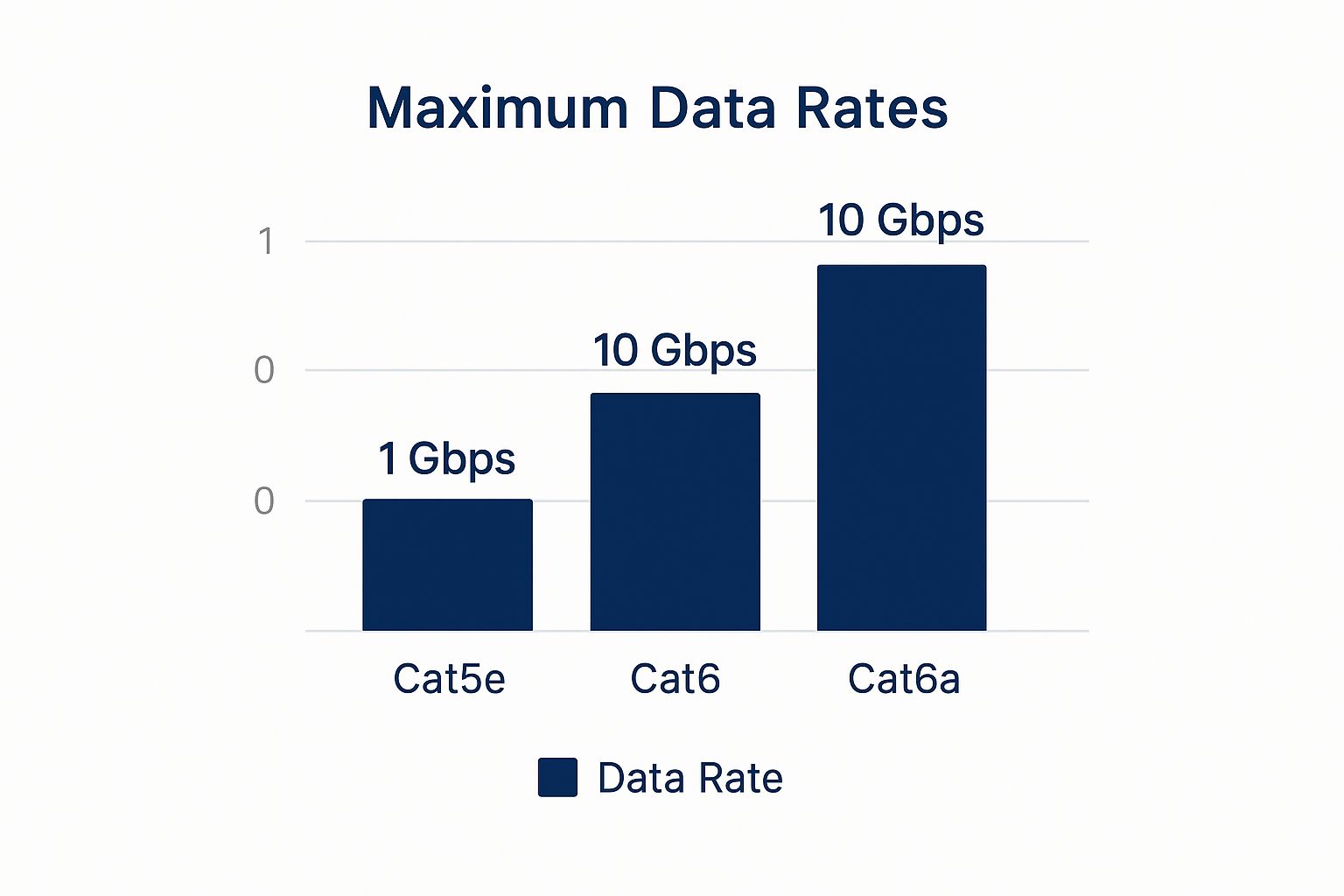
As you can see, both are rated for 10 Gbps, but Cat6a holds that speed over much longer runs with far greater reliability. It’s the superior choice for future-proofing, hands down.
In the end, our gamer went with Cat6a. The slightly higher upfront cost was a small price to pay for the peace of mind that his network wouldn’t be the bottleneck for years to come.
Cable Smackdown: Cat6 vs Cat6a vs Fibre
Choosing the right cable can feel a bit overwhelming. Here’s a quick-look guide to help you pick the right one for your Sydney, Newcastle, or Central Coast project based on what we see out in the field.
| Cable Type | Best For | Typical Speed | Cost Factor (AUD) | Future-Proofing Level |
|---|---|---|---|---|
| Cat6 | Standard home offices, small businesses, NBN connections (up to 1 Gbps) | Up to 10 Gbps over ~55 metres | $$ | Good |
| Cat6a | High-performance homes, future-focused businesses, data centres | 10 Gbps over the full 100 metres | $$$ | Excellent |
| Fibre | Linking buildings, ultra-high-speed needs, maximum security | 10 Gbps to 100+ Gbps | $$$$ | Ultimate |
Ultimately, the choice depends on balancing your budget with your long-term needs. For most new installations today, we find Cat6a hits that sweet spot of performance and value.
It’s More Than Just Cables: The Supporting Cast
A rock-solid network is about more than just the copper running through your walls. Skimping on the other components is a classic false economy—like putting cheap tyres on a sports car. You’re just creating weak points in the system.
Here are the other crucial bits and pieces you need to get right:
- Patch Panels: This is the central hub where all your data cables meet in the comms cabinet. A good one makes managing your network and troubleshooting issues a thousand times easier.
- Data Outlets (Wall Plates): These are the neat little sockets on your wall. Using high-quality outlets ensures a solid, reliable connection every time you plug something in.
- Cabinets and Racks: A proper comms cabinet keeps your sensitive network gear (like switches and modems) safe, cool, and organised. It’s non-negotiable for any serious installation.
- Network Switches: Think of the switch as the traffic controller for your network. A cheap, underpowered switch will slow everything down, no matter how good your cabling is.
The quality of these components is absolutely critical. The Australian electric cable and wire manufacturing industry, valued at around $2.2 billion AUD for 2025, has faced some ups and downs, reflecting shifts in infrastructure demand. This just highlights why choosing established, high-quality brands for your components is so important for long-term reliability.
Think of your network like a team. The cables might be your star players, but they can’t win the game without a solid supporting cast of patch panels, outlets, and switches. Every single component needs to perform.
Making these informed choices from the get-go is what ensures your data cabling system is robust and performs brilliantly for years.
How the Pros Actually Install Your Cabling
So, you’ve got your network plan sorted and the gear is ready to go. Now for the fun part: seeing how it all comes together. Having a box of Cat6a cable and a shiny new comms rack is one thing, but turning that into a rock-solid, high-speed network is a whole other ball game.
Let’s take a look behind the scenes and follow a team of pros on a typical small office fit-out. This isn’t just about pulling wires; it’s a genuine craft that mixes technical smarts with old-school trade skills.
Getting the Cables in Place
The first big job is often called ‘running the cables’, and trust me, there’s an art to it. It’s about much more than just getting a cable from point A to point B.
Navigating the Building’s Hidden Pathways
Think of it like trying to thread a needle through a maze you can’t even see. Installers have to work their way through the building’s hidden voids—inside wall cavities, above ceilings, and under floors—all while steering clear of some serious rookie mistakes.
One of the biggest no-nos? Running data cables right next to power lines. Electrical cables kick out a lot of “noise,” or electromagnetic interference (EMI). If your data cable gets too close, that interference can easily jump across and mess with your data signal. The result? Slow speeds and frustrating network dropouts. A pro knows the standards inside and out and always keeps a safe distance, often using separate conduits to keep them completely isolated.
Then there’s the sneaky issue of bend radius. Yep, that’s a real term! You can’t just yank a data cable around a sharp corner like it’s a bit of string. Every cable type has a minimum bend radius, and if you force it any tighter, you risk damaging the tiny, delicate twisted pairs inside. That’s a surefire way to kill performance.
The Precision of Termination
Once the cables have been run from the comms rack to every data point, the ‘termination’ phase kicks off. This is where absolute precision is key. It involves carefully stripping back the cable’s outer jacket, untwisting the eight small, colour-coded wires, and meticulously punching them down into a patch panel or attaching them to a connector.
It’s painstaking work. Just one wire in the wrong spot or a loose connection can cause the entire cable run to fail. This one small step is often the difference between a lightning-fast network and a port that’s completely dead.
A professional data cabling installation is defined by what you don’t see. It’s the carefully planned cable paths, the respect for bend radius inside the walls, and the perfectly terminated connections hidden behind a neat wall plate.
This meticulous approach is exactly the same whether it’s for a corporate workstation or a comprehensive home networking installation designed to handle a family’s ever-growing collection of devices.
Cable Management: The Unsung Hero
The last piece of the installation puzzle is cable management, and this is where a great installer really shows their pride. Instead of leaving a chaotic “spaghetti junction” of wires hanging in the comms rack, they take the time to turn it into a masterpiece of organisation.
Here’s how they do it:
- Cable Trays & Raceways: These create clean, dedicated highways for cables to travel along walls and through ceilings, keeping them protected and tidy.
- Velcro Ties & Labels: Every single cable gets bundled neatly and clearly labelled at both ends. It might seem like a small detail, but it’s a total lifesaver for any future troubleshooting or upgrades.
- Proper Service Loops: Good installers will always leave a little bit of extra cable coiled neatly at each end. This ‘service loop’ gives you some slack for any future moves or changes, so you don’t have to re-run the entire cable.
A tidy comms cabinet isn’t just for show—it’s incredibly practical. It allows for proper airflow, which stops your expensive network gear from overheating. Even more importantly, when you need to add a new connection or figure out a problem six months from now, a well-managed system makes the job fast and painless. It’s that kind of forward-thinking that separates a truly professional job from a cheap and nasty one.
Testing and Certifying Your New Network
So, the cables are all neatly tucked away in the walls, your comms cabinet is looking sharp, and every port is patched. Time to crack a cold one and call it a day, right?
Not so fast.
Skipping this final step is like building a custom V8 engine and never firing it up on a dyno to see what it can actually do. This is where a professional job truly separates itself from a DIY effort. We’re talking about testing and certification. For any network that needs to be reliable – so, basically all of them – this isn’t optional. It’s the only way to prove your new network infrastructure is performing to the standards it was designed for.
What Does Network Certification Actually Involve?
Let’s be clear: this isn’t just plugging in a laptop to see if you can get to Google. Proper certification is a rigorous, scientific process. It requires some seriously specialised (and eye-wateringly expensive) equipment, like a Fluke Network Analyser, to put every single cable run through a battery of tests.
Think of this device as an MRI for your network cabling. It sends high-frequency signals down each copper path and measures a whole suite of performance metrics against strict industry standards.
We’re meticulously checking for things like:
- Attenuation: How much signal strength is lost as it travels down the cable. Too much loss equals poor performance and dropouts.
- Crosstalk (NEXT): This is a huge one. It’s when the signal from one pair of wires bleeds over and interferes with an adjacent pair. It’s a dead giveaway of cheap cable or a poor termination.
- Return Loss: A measurement of the signal that gets reflected back toward the transmitter because of dodgy connectors or kinks in the cable.
- Wire Map: This is the most basic test, but it’s crucial. It confirms that all eight wires are connected to the correct pins on both ends. A single crossed wire can bring a connection to its knees.
After each test, the analyser generates a detailed report for every single cable, giving it a definitive “Pass” or “Fail”. This report is more than just a piece of paper; it’s your written guarantee that the physical backbone of your network is 100% solid.
A Quick Story From a Parramatta Office
I can’t stress this enough, and a job we did a while back is the perfect example. We got a call from a small accounting firm in Parramatta. They were tearing their hair out over incredibly frustrating network issues. Computers would randomly disconnect from the internet, copying a large file would take forever, and their VoIP phone calls sounded like they were underwater.
They admitted they’d used a local handyman to run the cables during an office fit-out to save a bit of cash. He’d done a tidy job on the surface, and things seemed to work… at first. After days of lost productivity and blaming their internet provider, they finally brought us in.
We plugged in our Fluke tester, and the problem jumped right out at us. Of their 20 new data points, a single cable failed its certification test. Badly. A poorly terminated jack hidden behind a wall plate was creating so much electrical noise and interference that it was poisoning the entire network.
That one tiny mistake was causing system-wide chaos.
Had the installation been properly tested and certified from the beginning, that fault would have been identified and fixed in minutes. Instead, the business lost days of productivity and ended up paying for us to come and fix it anyway. That’s the difference. Certification gives you peace of mind and guarantees your network is ready for business from day one.
Why Professional Installation Is a Smart Move
Thinking of running a few data cables yourself this weekend? It can be tempting, especially when you’re just trying to get a better NBN connection sorted at home. Before you start drilling holes, let’s zoom out for a second and look at the bigger picture.
From your living room all the way to the massive data centres popping up around Sydney, the same rules apply.
Those facilities are the humming hearts of our digital economy, and they demand absolutely flawless cabling. The principles that govern a multi-million-dollar data centre—precision, strict adherence to standards, and robust testing—are the very same ones that define a high-quality data cabling installation in your office or home.
The Tools and the Talent
A professional cabler rocks up to a job with a lot more than just a roll of Cat6 and a can-do attitude. They bring years of certified training, a deep understanding of complex standards, and a van full of specialised tools that most DIY-ers have never even seen.
We’re talking about expensive network analysers for certification, precision termination tools, and specific gear designed to run cables safely through tricky wall cavities without causing damage.
It’s not just about connecting a few wires; it’s about building a reliable digital foundation. A pro knows the rules inside and out, like the AS/CA S009 standard, which dictates exactly how data cables must be installed to be compliant and, more importantly, safe. They also carry the right insurance, giving you peace of mind that you’re covered if anything goes pear-shaped.
A professional installation isn’t just another expense; it’s an investment in reliability. You’re paying for the guarantee that every connection is solid, every cable is certified, and the whole system is built to last.
The Big Picture: Sydney’s Data Centre Boom
The demand for expert cabling isn’t just about faster Netflix streams. It’s being driven by absolutely massive infrastructure growth right here in Australia.
Consider this: the Australian data centre market, with Sydney as a major hub, was valued at $6.81 billion AUD in 2024. That figure is projected to rocket to $8.58 billion AUD by 2030. This incredible growth fuels a constant need for pristine, high-performance data cabling installed by experts.
This boom really highlights the critical importance of getting cabling right the first time. The same meticulous standards used in those giant facilities should be the benchmark for every single job, big or small.
Why It Matters for Your Project
So, how does all this data centre talk relate to the network in your home or office? It’s simple. A professional brings that same data-centre level of precision and foresight to your project.
They build your network with the future in mind, ensuring it can handle not just your current needs but also the dozens of new devices and data-hungry applications of tomorrow.
Whether you’re looking to finally eliminate Wi-Fi dead zones or set up a rock-solid network for your family, a professional home network installation will deliver performance and reliability a DIY job simply can’t match. They make sure every cable is terminated perfectly, tested thoroughly, and ready for whatever you throw at it.
It’s the difference between a network that just works and one that works brilliantly, every single time.
Your Data Cabling Questions Answered
https://www.youtube.com/embed/NWhoJp8UQpo
We get it. Kicking off a data cabling installation project can open up a can of worms, and a lot of questions. Over the years, we’ve heard just about everything from our clients across the Central Coast, Sydney, and Newcastle.
So, we’ve put together a quick-fire round of the most common queries we tackle day in and day out.
How Much Does Data Cabling Installation Cost in Australia?
Ah, the classic ‘how long is a piece of string’ question! It’s a tough one to answer without seeing the job, but we can definitely give you a ballpark figure to work with.
For a standard, straightforward Cat6 data point in a typical Sydney or Newcastle home with easy access (think timber frames and a bit of roof space), you’re usually looking at somewhere between $150 to $250 per point.
Of course, a few things can nudge that price up or down:
- Complexity: Trying to snake a cable through a double-brick wall in a heritage terrace is a whole different ball game compared to a simple plasterboard job.
- Cable Type: If you’re looking to future-proof with Cat6a or even fibre, it’ll naturally cost a bit more than standard Cat6.
- Job Size: A single data point might have a higher per-point cost. On the other hand, a full office fit-out with 50 points often brings the cost per point down, thanks to economies of scale.
The golden rule? Always get a detailed, itemised quote from a licensed and insured cabler. This is the best way to make sure there are no nasty surprises waiting for you on the final invoice.
Can My Electrician Do My Data Cabling?
This is a really common point of confusion, and the answer is a firm “not necessarily.” While a lot of sparkies are dual-qualified, holding an electrical licence doesn’t automatically mean you’re licensed to run data cabling.
In Australia, anyone who works on data, phone, or security cabling must hold an Open Cabler Registration. This is issued by an ACMA-accredited body and is a completely separate qualification from an electrical ticket. It proves the installer understands the specific standards for communication cabling—like the critical need to keep it separate from electrical wiring to avoid interference and serious safety risks.
So, before anyone starts drilling holes, just ask to see their ‘Open Cabler’ license. It’s a quick check for peace of mind.
What Is Structured Cabling Anyway?
Think of it as the difference between organised bliss and a chaotic mess of wires behind the TV.
Simply running a long ethernet cable from your NBN modem to your gaming console is just ‘cabling’. It does the job, but that’s about it.
Structured cabling, on the other hand, is a complete, standardised system designed for an entire building. It’s a methodical approach where all the cables for your data, phones, and other services run from a central hub (like a comms cabinet) out to neatly installed data outlets in each room.
Everything is organised, labelled, tested, and built to a specific standard. This makes your network incredibly reliable, easy to manage, and a breeze to expand or upgrade later on. It’s the professional standard for any modern business or smart home.
Is Cat6 Enough For My Home or Do I Need Cat6a?
For most homes on the Central Coast today, Cat6 is perfectly fine. It easily handles speeds up to 10 Gbps over shorter distances, which is more than enough for current NBN plans, 4K streaming, and online gaming. It really hits that sweet spot between performance and budget.
However, if you’re building a new home, doing a major renovation, or just want to be set for whatever comes next, investing in Cat6a is a very smart move. It reliably supports those top-tier 10 Gbps speeds over the full 100-metre distance and provides better shielding against interference from other electrical gear.
It’s simply the best way to future-proof your home’s network backbone.
Of course, even the best-wired network needs a solid wireless connection. You might be interested in our expert tips on how to secure your Wi-Fi network to keep your connection both fast and safe.





